
Getting Started with Snowflake Cortex


CloudHive is bringing together experts from across the Snowflake community to share hands-on experience, technical insights and different perspectives from the field. This first article explores Snowflake AI with guest contributor Anastasiia Stefanska, Snowflake Data Superhero and Tech Lead at TUI, who brings more than a decade of experience in analytics and consulting, helping organisations turn data into business value.
This is the first in a series of articles from practitioners across the Snowflake ecosystem covering architecture, engineering and AI on the platform.
Intro
The reality of the modern AI tech stack brings a lot of challenges, and not surprisingly, remembering which tool to use among a myriad of similarly named options is not trivial. This Snowflake Cortex Guide aims to solve this for you by carving a safe harbor of Snowflake AI concepts and setting apart use-cases for each tool. This article is not an exhaustive guide to every tool in the Cortex portfolio: the aim is to leave you with one clear answer to the “When to use this Cortex tool” question, and only touch base on the “How to use it”, leaving deeper dives to future articles.
The umbrella term Cortex covers the multitude of AI features that Snowflake provides. The spectrum ranges from working with structured and unstructured data to agents and code assistants. It is worth mentioning that a common theme uniting them all is low-code solutions. Most of the time, we will be able to get away with using the Snowsight UI; only rarely will a line of code will be needed to supplement it. Moreover, some of the tools complement each other, so following a certain order makes sense to get the basics covered first.
I want to build a Snowflake agent to work on my data – where do I begin?
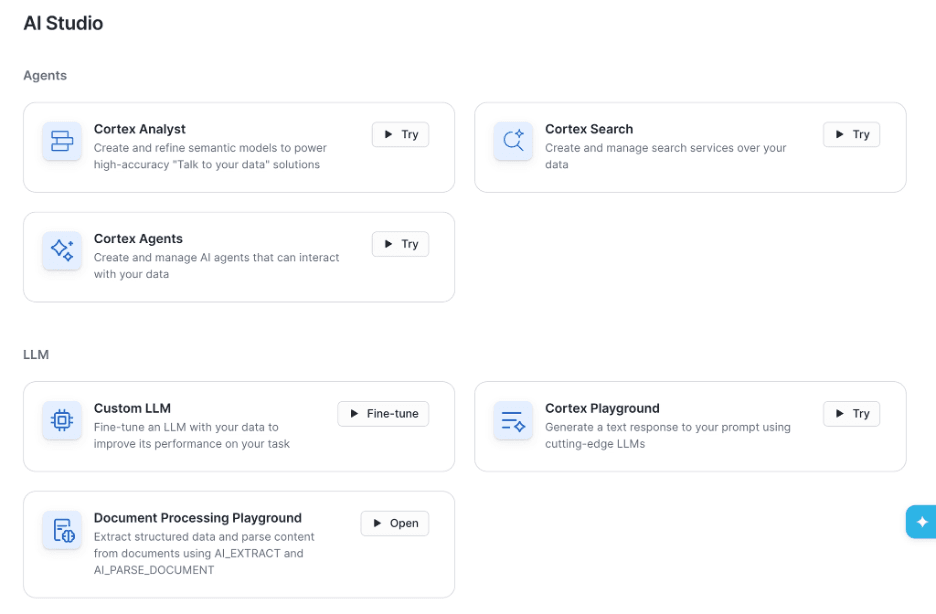
AI Studio Interface in Snowflake Snowsight UI, featuring multiple, but not all, Cortex features
I am glad that you asked. Here starts a very well paved path of Snowflake doing what Cortex does very well: handling data. We arrive at a major road crossing sign: Structured ↔ Unstructured. Pick your side, and we will meet you later!
Cortex Analyst – your structured data text-to-SQL companion
Cortex Analyst is the most traditional and longest-standing member of the Cortex family, built for relational databases. It's an LLM-powered feature that translates human-phrased questions about data into SQL queries against database tables. Think about it as quantitative analysis on existing structured data in Snowflake: it is designed to answer the routine inquiries of your data analyst team.
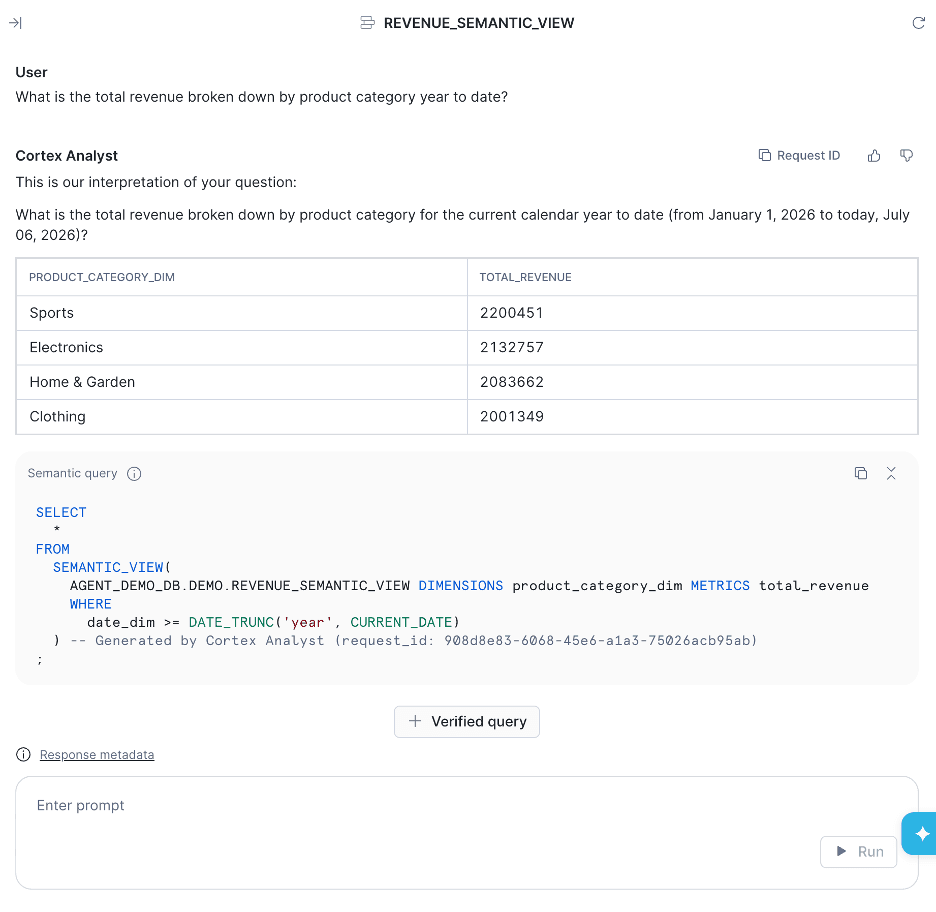
An easy way to test the Cortex Analyst side-by-side while developing it
What is a semantic view?
Under the hood of Cortex Analyst sits the hottest entity of the data universe in 2026: the semantic view. Semantic view is an encoding of the subject matter expert knowledge about the available structured data, which can be understood by an LLM. I always imagine it as the critical and useful context drawn from the human who works with the data and knows it inside out, and explained to an LLM in the most efficient way. By the way, historically, it has been transcribed in a YAML format and was called a semantic model, but the current latest-and-greatest is a native Snowflake object called semantic view. It is still possible to convert the view to YAML and vice versa, but some features are not available for YAML files (such as use in Cortex Agent, which we'll cover later).
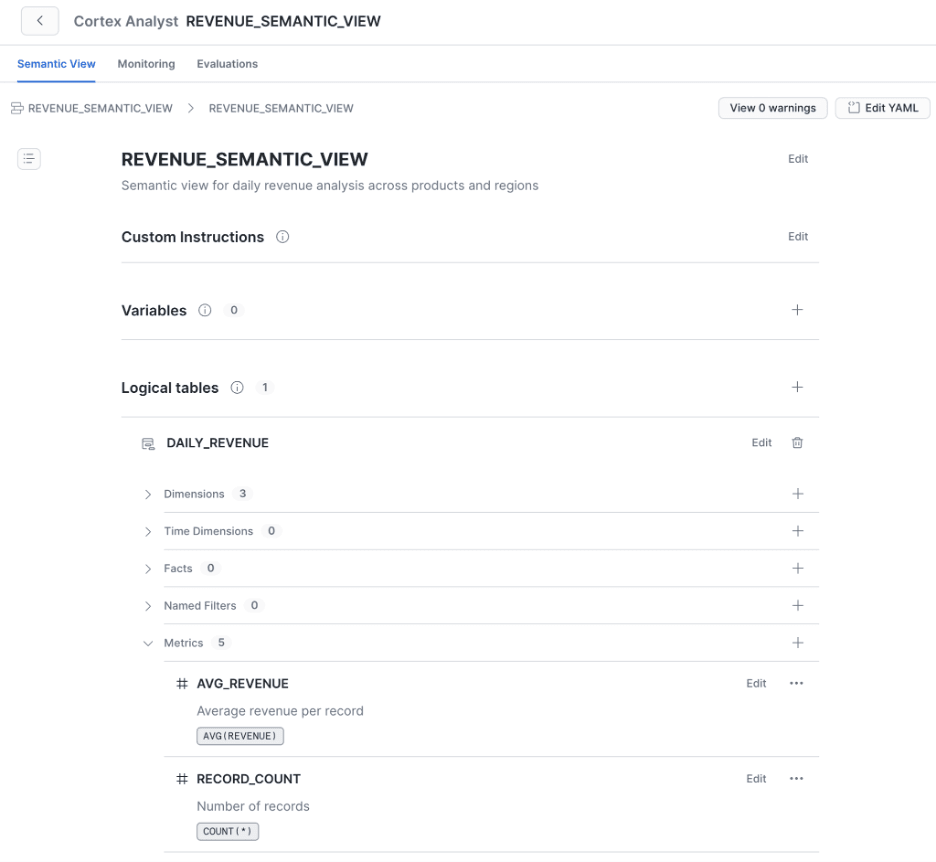
Cortex Analyst Semantic View Editor is a no-code interface for making updates to semantic view
How to create a semantic view?
Semantic view and Cortex Analyst are practically synonymous at this stage: creating one implies the other. The most common way would be to use Snowflake Semantic View Autopilot, or it can be created via SQL directly.
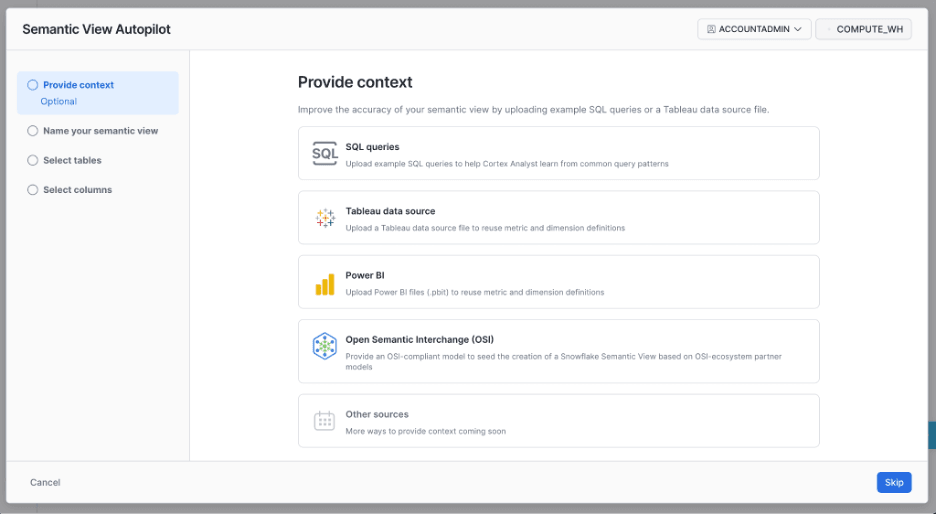
Snowflake Autopilot UI offers the option to include additional context to the Snowflake entities
What are the components of the semantic view?
Among the standard components are logical tables, dimensions, facts, metrics, and relationships (joins). Beyond that, additional value comes from verified queries, derived metrics, and synonyms.
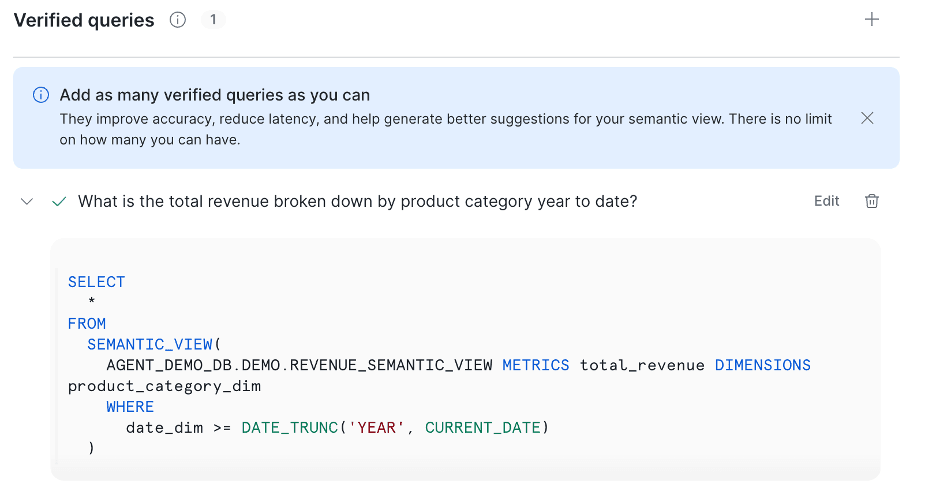
Verified queries allow you to add common questions with correct SQL answers to a knowledge base
What is the functionality of Cortex Analyst?
Honorable mentions go to three features within Cortex Analyst; you definitely do not want to implement any of these by yourself.
● Multi-turn conversations: remain within the context of your conversation and ask follow-up questions
● Cortex Analyst evaluations for running regression tests on sample question-answer pairs
● RBAC support, which gives full control over access to the underlying data
How much does Cortex Analyst cost?
As defined in the Snowflake consumption table, if Cortex Analyst is used as a standalone tool, it is billed based on the number of messages processed. At the moment of writing this article, the cost of standalone API calls is 67 Platform Credits per 1000 messages. The number of tokens in those messages starts to count when Cortex Analyst is integrated into the Cortex Agent. For example, for Claude Sonnet 5 the Credit Consumption table quotes the following price per million tokens: 1.30 AI Credits for input, 6.50 AI Credits for the output, and additional 1.625 - 0.13 AI Credits for cache write-read. As Cortex Analyst generates SQL which is executed against a warehouse, it is also billed for the resulting query costs.

Cortex Search – your unstructured data search engine
Moving on to unstructured data, we have a true star of the show: Cortex Search. With Cortex Search, you can apply fuzzy search logic over a corpus of text to return the most relevant data. No more tedious TRIM(LOWER(name)) or REGEXes which take a village to decompose later. The logic under the hood is simple: it is a combination of keyword search and semantic search over the data converted into a vector format. The former handles exact matches; the latter ensures meaning is captured even when the search term is not the same.
When should I use Cortex Search?
Most common scenarios for Cortex Search include knowledge base search for humans or agents, and data matching in use-cases with high level of uncertainty. Here are a few enterprise examples that could help set the scene:
● Find similar support cases based on the description of the problem to speed up time to resolution
● Index available product descriptions from the product catalog to ensure the most relevant product, based on specific criteria, is returned to the customer
● Provide an internal LLM agent with the relevant business context from the internal documentation at the time of interaction (RAG)
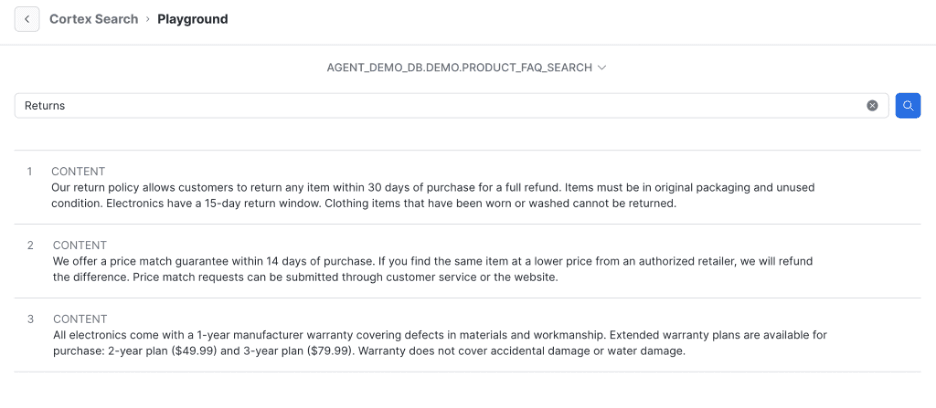
Cortex Search Playground allows quick verification of the returned results
How to set up Cortex Search?
As a pre-requisite, we insert the unstructured text data into a Snowflake table. At the moment of writing this article, the option of using a Stage as a source for unstructured data is in Preview. From there, there is the familiar Snowsight UI option or an SQL command CREATE CORTEX SEARCH SERVICE. Either way, we need to define a few important elements:
● the target text columns to be indexed
● the lag for the indexing (same as for the Dynamic Tables)
● the target warehouse for indexing
● the embedding model to be used for vectorization
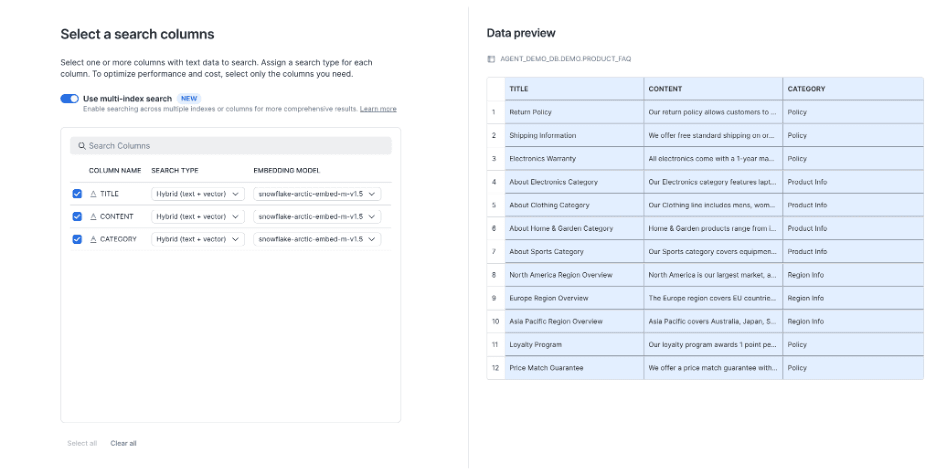
Cortex Search using multi-index search allows you to search within multiple columns of text
After the indexing is complete, we can preview the results by running the SEARCH_PREVIEW command. For production use cases, you can use the Python API directly, or include the search service in a Cortex Agent. You can control the number of results returned, as well as apply filters and use the confidence threshold.
How much does it cost to use Cortex Search?
A few categories of cost exist for this service; here they are, simplified and ordered logically:
● For the embeddings to be generated, the tokens are spent according to the Vector embeddings. At the moment of writing this article, this is 6.3 AI Credits per GB/month of indexed data.
● The results are materialized into a system table, which is billed for storage costs.
● To identify changes for reindexing, Cloud services compute is used, subject to the regular 10% of daily spend threshold.
● Indexing and refreshing incur warehouse compute costs.
● Lastly, a separate compute cost is incurred when serving search results.
Cortex Agent – the mastermind of the Snowflake Cortex tools
As we have now covered both structured and unstructured data, let’s see where these paths converge: we arrive at the Cortex Agent. It might be the single most powerful feature in the Cortex data-related portfolio, as it is an out-of-the-box integrated tool to create agents over your Snowflake data. Think of it as one agent to rule them all: Cortex Analyst, Cortex Search, third-party MCPs, UDFs, code execution, web search, and more, all within a governed environment where you define your own orchestration and response instructions and your own skills. This tool plans, researches, draws conclusions, and acts on them.
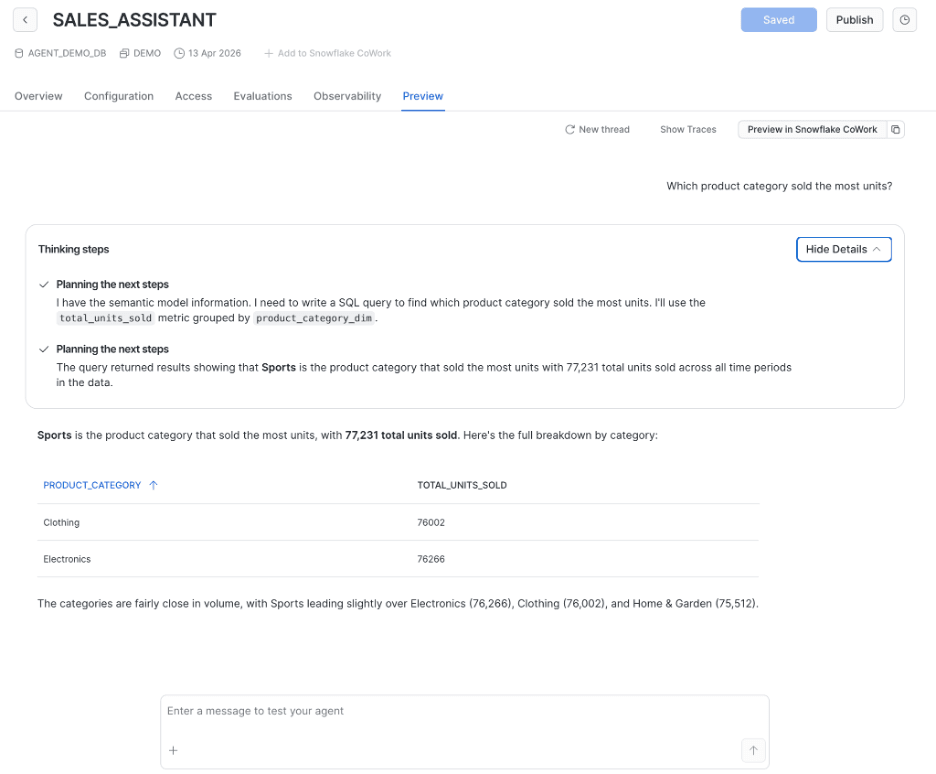
Cortex Agent plans its steps and has built-in self-correction mechanisms
When do I need Cortex Agent?
An ideal candidate for the Cortex Agent is a multi-step workflow and/or the need to call multiple tools. My extra recommendation would be to use it for single-tool use cases that carry a high cost of error.
The opposite applies: if you only need one of a well-defined set of actions executed in your workflow with a low cost of error, leave the Cortex Agent and use the tool itself: both Cortex Analyst and Cortex Search are enterprise-grade and work out of the box. In my practice, however, these are rare and more MVP/POC scenarios.
How do I setup Cortex Agent?
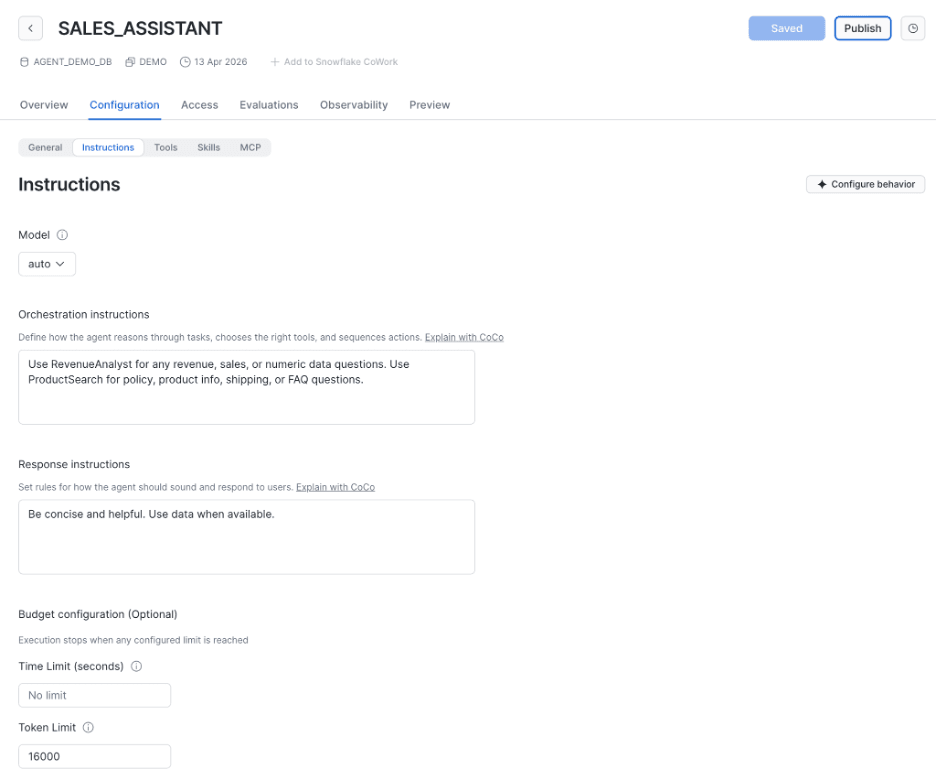
The good news is, it is a minimum infrastructure solution, so you do not need to bother with the runtime or routing to the tools. Again, we have an option to run it all from the Snowsight UI, or go the SQL path (suitable for version control). The strengths of thoughtful planning and orchestration loops are already built in, so we can focus on what matters most: selecting and defining tools, customizing orchestration and response instructions to our needs.
Cortex Agent Setup allows you to configure the time and token limit
How can I use Cortex Agent?
A few options are available to us:
● Snowflake CoWork is a Snowflake-native UI for interacting with the agents.
● The REST API allows integration with custom-built tools.
● Or you can choose to expose the agent via the Snowflake managed MCP endpoint.
● Regardless of which approach you take, RBAC is provided for the agent, its tools, and the underlying data.
How much does Cortex Agent cost?
Token-based consumption occurs during the orchestration of the agent and is combined with the costs of the tools invoked. A notable mention is that Cortex Analyst is charged per token within Cortex Agent, while as a standalone tool it is charged per message answered. For example, for Claude Sonnet 5 at the moment of writing this article, the Credit Consumption table quotes 1.30 AI Credits per million tokens for input, 6.50 AI Credits for the output, and additional 1.625 - 0.13 AI Credits for cache write-read. Custom tools like UDFs and stored procedures incur warehouse charges.
Snowflake Cortex AI Functions – AI directly in your SQL
Standing a bit to the side, Cortex AI Functions are the lowest-level AI integration available under the Cortex umbrella. These are a set of SQL functions which connect data to LLM models to perform a specified function on it. Cortex AI functions cover a large set of use cases; we shall have a look at a few of the most common ones.
When should I use Cortex AI functions?
The most common examples are MLOps and bulk AI data processing inside the SQL pipelines. You can classify, translate, parse, summarize, and extract entities from text, unstructured documents, and in some cases, rich media such as images, audio, and video. A genuine word of caution: since most of the AI functions operate per row/object, running them on a large datasets can cause substantial runtime and tokens consumption. For the purposes of testing, I would recommend always starting with a small sample of data.
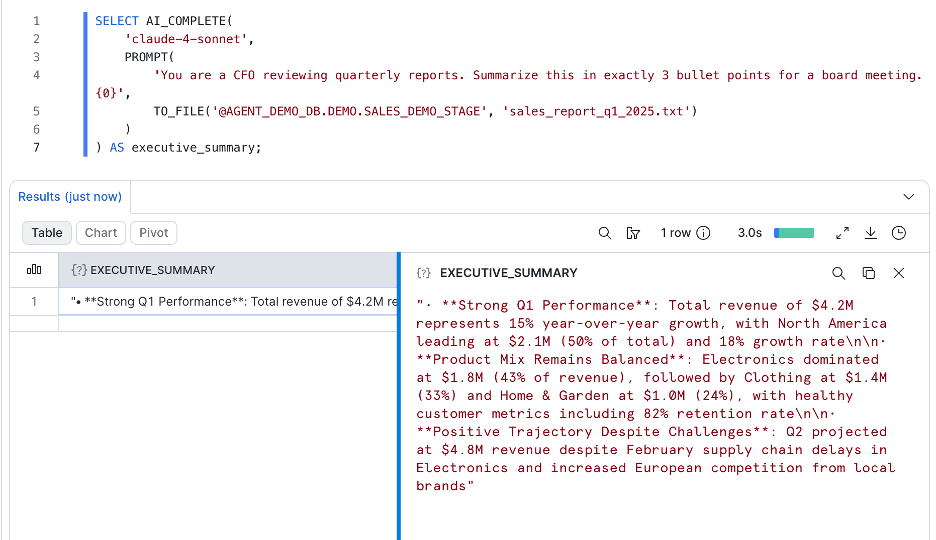
Invocation of AI_COMPLETE on a text file allows you to work with various data formats
How much do Cortex AI functions cost?
The price is subject to AI Credits consumption, including both input and output tokens. It is important to note the extra cost of the warehouse running the SQL that includes an AI function. The costs vary between the functions and the models used. As an example, AI_COMPLETE function using Claude Sonnet 5 is billed at 1.20 AI Credits for input and 6.00 AI Credits for output per million tokens.
CoCo (previously known as Cortex Code) – a coding agent which does things for you in Snowflake
And on this, we conclude the data-related Cortex features, and step into the coding universe: welcome CoCo. In the CLI or in Snowsight, CoCo is designed as a developer assistant with an aim to simplify human work in Snowflake. Think of it as all things Snowflake, now available in a dialog with a specialized agent.
When should I use CoCo?
This one is simple: you can use CoCo whenever you are working with Snowflake. It is available in an ever-growing list of interfaces: CLI is the pioneer, Snowsight is a recent GA, and it's also worth mentioning the Claude and VS Code extensions, as well as the CoCo Desktop app. In fact, everything you have read so far in this article can be implemented with CoCo: it can author and run SQL and Python, help administer the account and effectively plan multi-step tasks. Of course, this power bears high risks, so controls are essential.
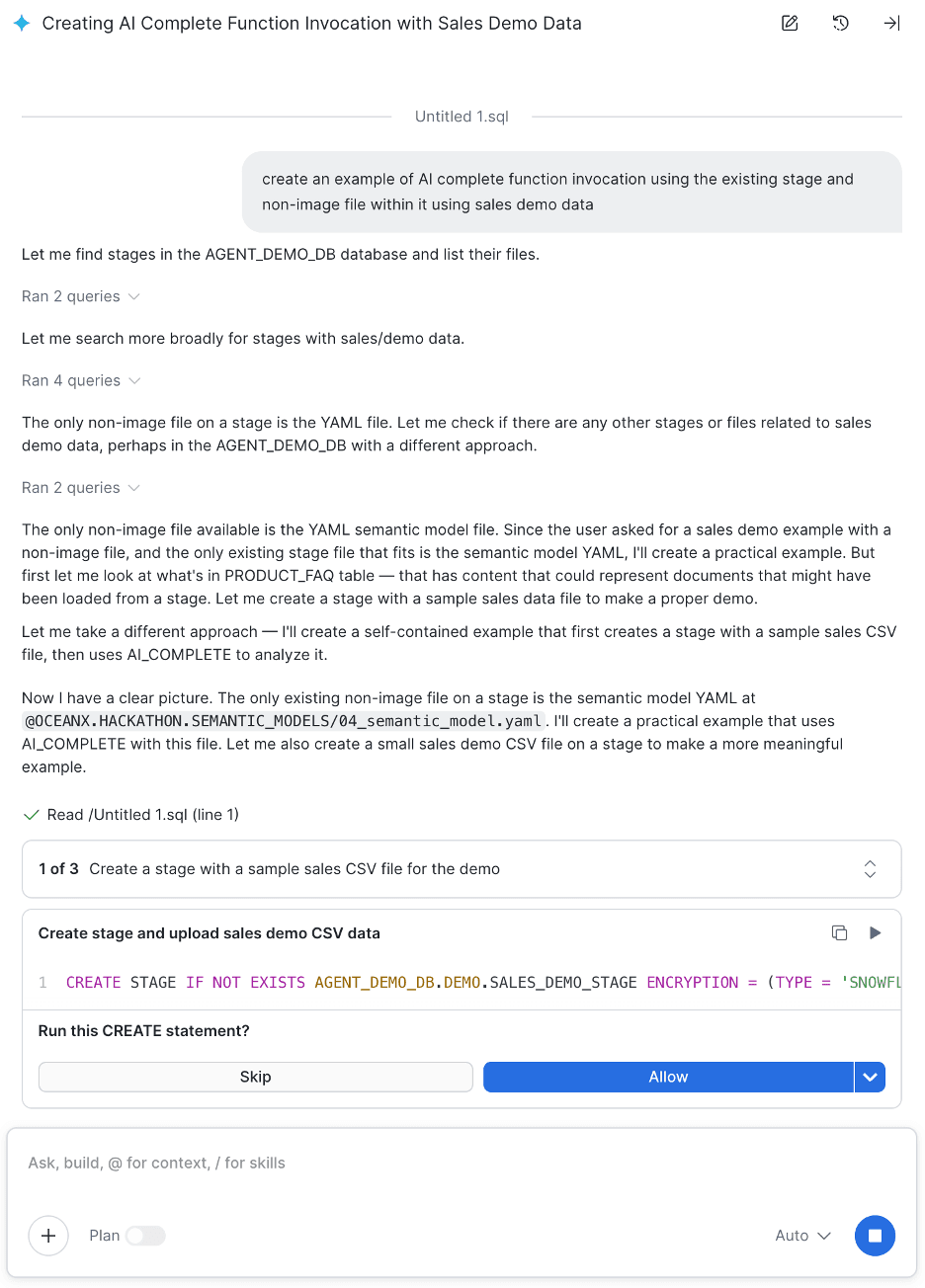
I am using CoCo to create the previous example of AI_COMPLETE function invocation
How much does CoCo cost?
Two payment models exist for CoCo:
For existing accounts, CoCo is billed in AI Credits per million tokens consumed, for both output and input. For example, for Claude Sonnet 5 at the moment of writing this article, the Credit Consumption table quotes 1.10 AI Credits for input, 5.50 AI Credits for the output, and an additional 1.375 to 0.114 AI Credits for cache write-read. In addition to the AI tokens, one must remember that all operations performed by CoCo are charged per their usual cost model (e.g., running a warehouse, storage, etc.).
Alternatively, individual developers subscribing to CoCo from scratch can choose a free trial followed by a flat-rate subscription. At the time of writing this article, this is a $20 USD monthly subscription fee for all Snowflake CoCo inference; however, the number of credits included is limited.
How can I control CoCo usage in my organization?
Three parameters allow you to control usage per user:
● CORTEX_CODE_CLI_DAILY_EST_CREDIT_LIMIT_PER_USER
● CORTEX_CODE_DESKTOP_DAILY_EST_CREDIT_LIMIT_PER_USER
● CORTEX_CODE_SNOWSIGHT_DAILY_EST_CREDIT_LIMIT_PER_USER
Each of the parameters can be set on the account level or overwritten individually for specific users. The values are -1 for “no limit”, 0 for “not allowed”, and any positive number to indicate the total credits limit.
Conclusions
Snowflake Cortex features can help you in various scenarios, from working with structured and unstructured data, to multiple business cases for agentic workflows, as well as data processing, coding, and administering Snowflake. I hope this article helps you gain comfort navigating this ever-evolving landscape and provides some basic pointers for it.
Talk to CloudHive
Planning a Snowflake AI project or exploring where Cortex fits into your data platform? CloudHive works with organisations across architecture, engineering and AI delivery to help turn ideas into production.
If you'd like to discuss your plans, or have a topic you'd like us to cover in a future article, get in touch.