
Cortex Search – Two Applications for Enterprise Use


In this article, we are going to explore Snowflake Cortex Search and two of its applications that open up some unique options in the enterprise context. We will dive into the details of how to use it, along with some use cases I hope will spark ideas. But first, let's cover the basics.
How does Cortex Search work?
Snowflake Cortex Search is a fully managed hybrid search service. It combines keyword search and semantic search using vector embeddings over text columns in your tables. Cortex Search indexes those text columns and creates vector embeddings for them. This lets you search data for semantic similarity in addition to classic keyword matching. When you query it, Cortex Search returns row-level data containing the searchable columns and any other columns you specify, ranked by the relevance of the indexed columns to the query.
How to create Cortex Search?
You can create a Cortex Search service in Snowsight or using SQL. Important elements to specify include:
- indexed columns - these are the ones the search runs on
- attributes - these are the columns you can filter results on at query time
- target lag - this controls the freshness of the index, and therefore of the results
Let's look at an example: the CUSTOMER_CASES table, which contains the TOPIC, REQUEST, and AGENT_RESPONSE columns describing specific issues. We would like to index TOPIC and REQUEST, make CASE_ID filterable as an attribute, and return CASE_ID and AGENT_RESPONSE alongside the search results.
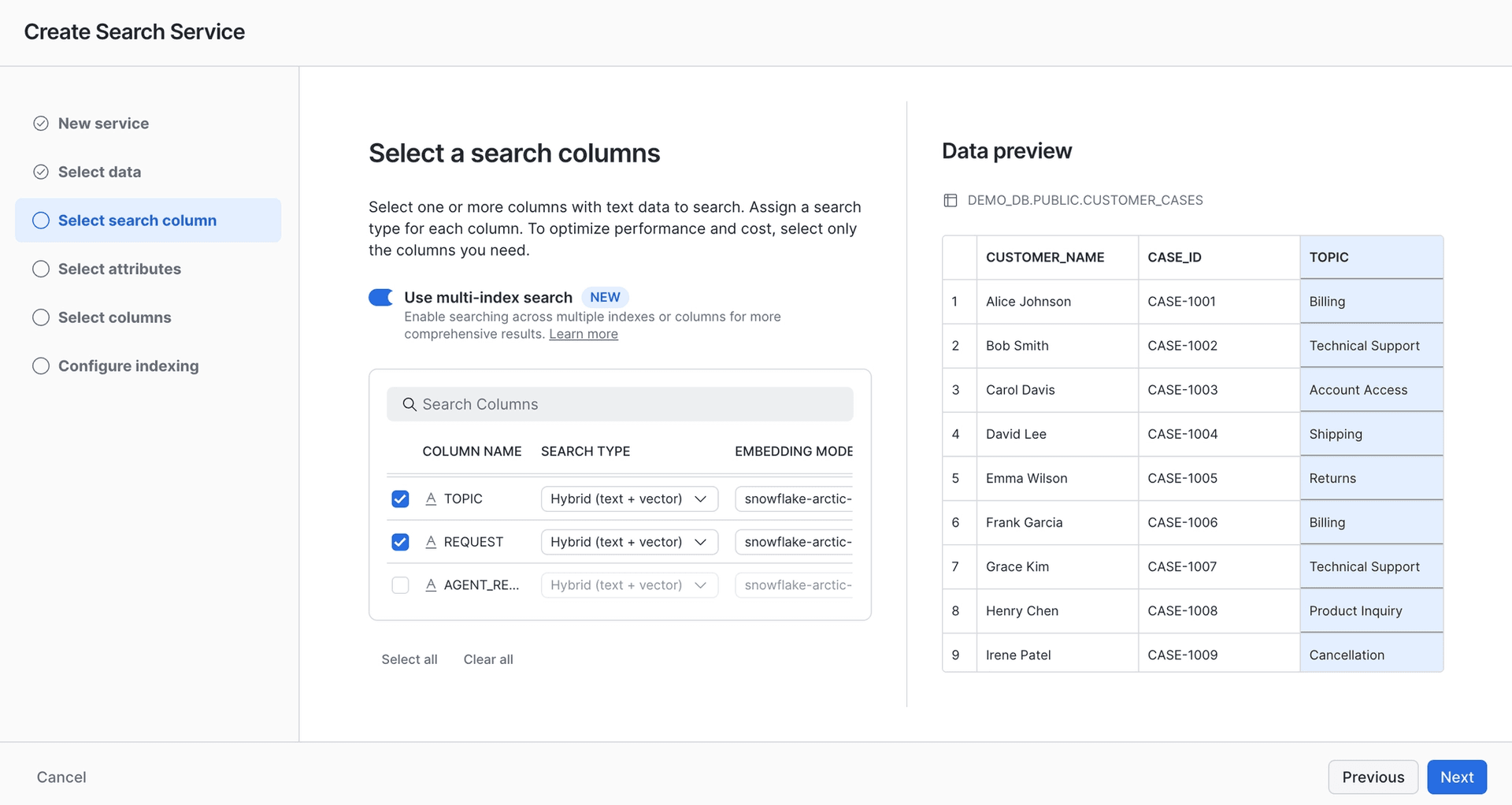
Adding columns for text and vector indexing in the Snowsight UI
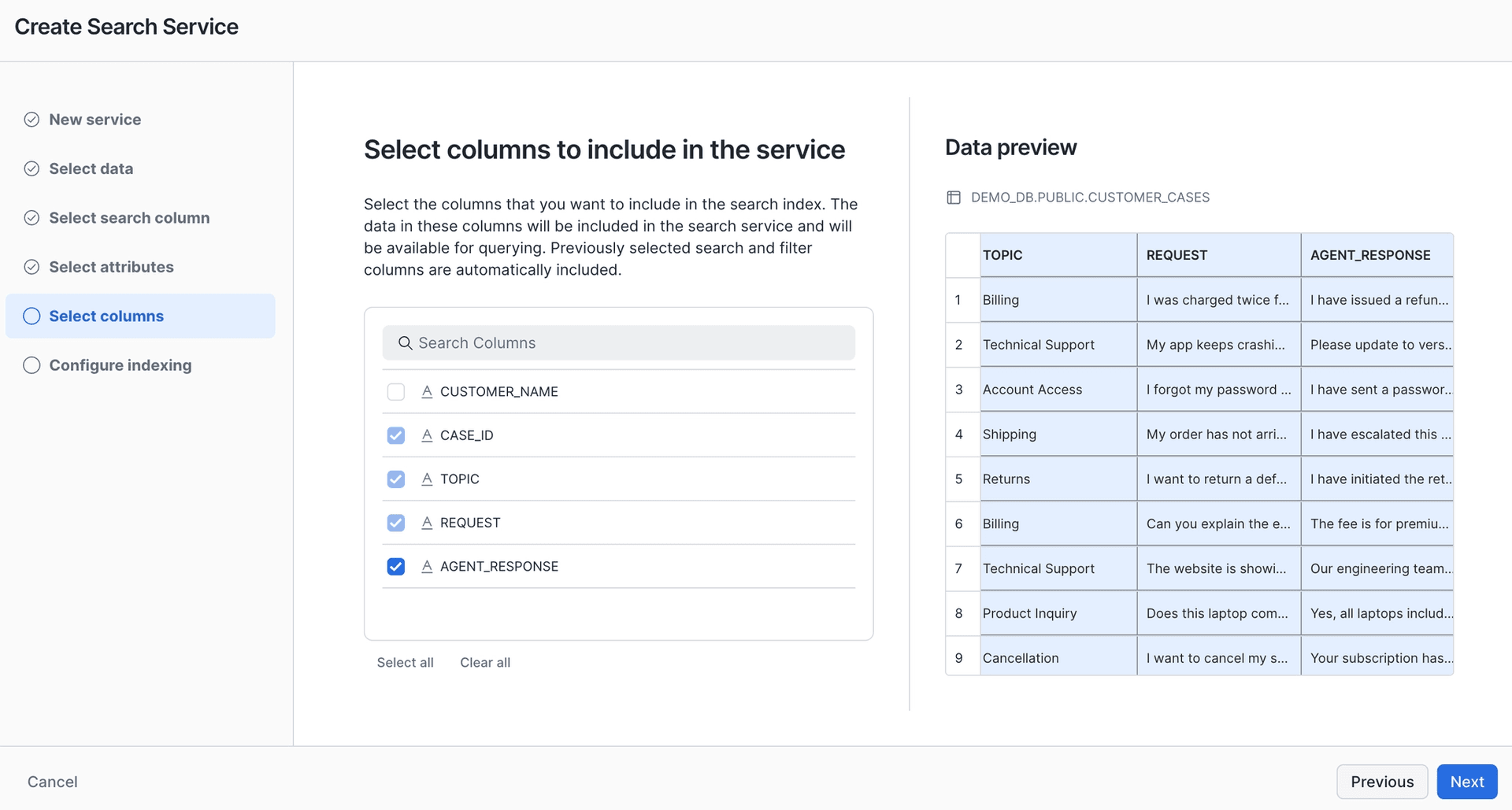
Adding the columns returned by the service in the Snowsight UI
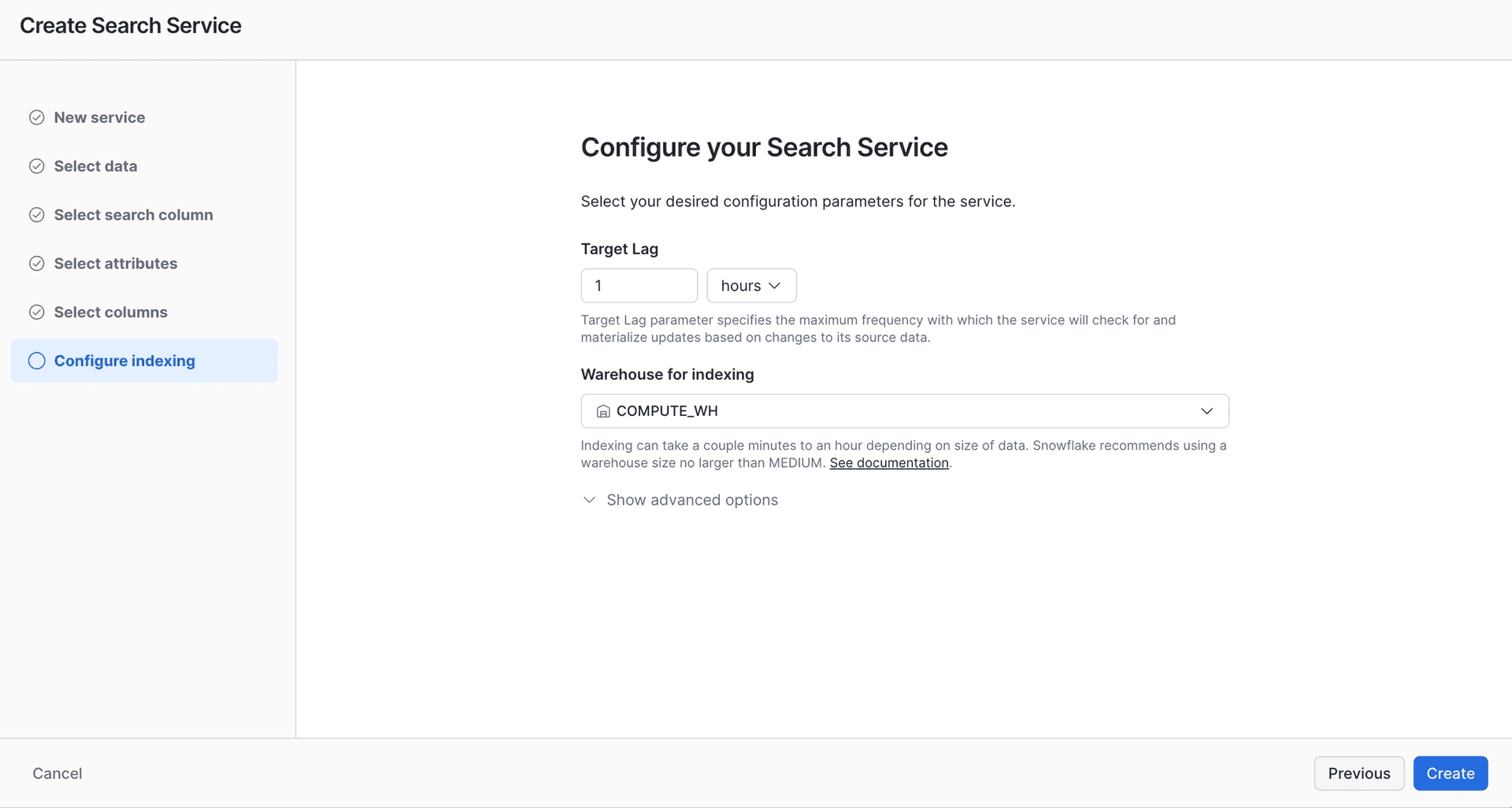
Adding target lag in the Snowsight UI
If you prefer the SQL path, here is the complete statement to achieve the same result.
CREATE OR REPLACE CORTEX SEARCH SERVICE DEMO_DB.PUBLIC.CUSTOMER_CASES_SEARCH
TEXT INDEXES TOPIC, REQUEST
VECTOR INDEXES TOPIC (model='snowflake-arctic-embed-m-v1.5'), REQUEST (model='snowflake-arctic-embed-m-v1.5')
ATTRIBUTES CASE_ID
WAREHOUSE = COMPUTE_WH
TARGET_LAG = '1 hour'
AS (
SELECT
CASE_ID,
TOPIC,
REQUEST,
AGENT_RESPONSE
FROM DEMO_DB.PUBLIC.CUSTOMER_CASES
);
With the service created, we can look at the two main ways to use Cortex Search in the enterprise context.
First use case: advanced search in your data
The benefit of hybrid search is the ability to find results without knowing the exact wording. Taking our newly built search as an example, let’s say we would like the Customer Excellence team to be able to search existing cases while troubleshooting the customer issues they are working on.
Existing cases often capture vague customer requests: the customer does not know the root cause or the exact product name, so they start by describing the issue and its symptoms. At this point, we would like a Customer Excellence representative to have a search bar where they can enter those symptoms and surface other cases with a similar issue, along with how other agents responded to them:
SELECT PARSE_JSON(
SNOWFLAKE.CORTEX.SEARCH_PREVIEW(
'DEMO_DB.PUBLIC.CUSTOMER_CASES_SEARCH',
'{
"query": "charged twice",
"columns": ["CASE_ID", "TOPIC", "REQUEST", "AGENT_RESPONSE"],
"limit": 10
}'
)
)['results'] AS results;
As you would expect, the results are ranked by relevance, so this is a good point to look at how Cortex Search scoring works.
How to improve Cortex Search scoring?
The Cortex Search score combines vector similarity, text matching, and semantic reranking. By default, all three contribute equally, but you can configure their weights to tune the ranking. For example, if text matching matters much more in your use case, you can pass a scoring_config with your query like the following:
"scoring_config": {
"weights": {
"texts": 3,
"vectors": 1,
"reranker": 1
}
}
If you use the same configuration repeatedly, you can save it as a named scoring profile with ALTER CORTEX SEARCH SERVICE … ADD SCORING PROFILE and reference it with the scoring_profile parameter instead.
Similarly, you can boost specific columns in a multi-index search, on the text index, the vector index, or both. For example, if you want matches to come mainly from one column and use a second one as a fallback, you can set up the following configuration:
"scoring_config": {
"functions": {
"text_boosts": [
{"column": "TOPIC", "weight": 1},
{"column": "REQUEST", "weight": 3}
],
"vector_boosts": [
{"column": "TOPIC", "weight": 1},
{"column": "REQUEST", "weight": 3}
]
}
}
Lastly, if your data includes numeric or time-based relevance signals, such as rankings or recency timestamps, you can factor those in as well, using numeric_boosts and time_decays in the scoring_config.
Now, with enterprise search sorted, it is time to give this use case a new level of intelligence: plug the results of Cortex Search into AI.
Second use case: use Cortex Search as a tool in Cortex Agent
Imagine the same department, Customer Excellence, working through customer cases. But now, instead of colleagues pulling the example cases and going through them one by one in search of a possible solution, we delegate this preparation to an AI agent. This is where Cortex Agent comes into play. You can plug Cortex Search into it as a tool, enabling both search and analysis of the results. On top of that, you can run analytics across your whole corpus of unstructured data, asking questions like “what were the most frequent case topics in the last two months?” This capability has recently been rolled out as a Preview feature named Analytical search.
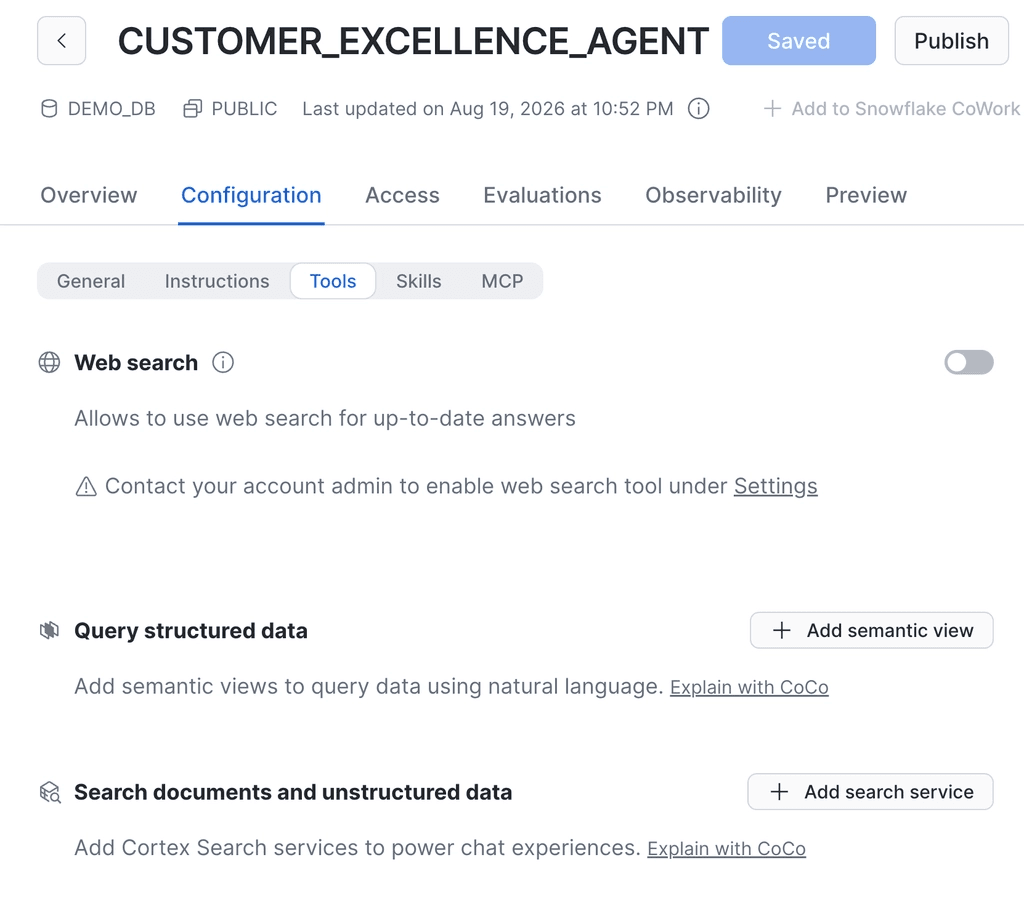
You can add Cortex Search as a Cortex Agent tool in the Snowsight UI
Importantly, you should always include a relevant tool description so the agent uses Cortex Search correctly, and spell out when the tool should be used in the orchestration instructions. You can read more about best practices for setting up Cortex Agents in my previous article. Here is an example of a Cortex Search tool description matching the above use case:
Use this tool to search through historical customer support cases to find similar past issues and their resolutions. This tool supports two modes:
1. **Standard retrieval**: Find specific past cases that are similar to the current customer issue, including the resolution steps taken.
2. **Analytical search**: Answer aggregate questions about the case corpus, such as identifying the most frequent case topics over a time period, common resolution patterns, or trending issues.
Use standard retrieval when the user describes a specific customer problem and needs example resolutions. Use analytical search when the user asks about trends, frequencies, distributions, or patterns across many cases.
How much does Cortex Search cost?
Cortex Search pricing has a few components:
Serving compute: a Snowflake-managed resource that incurs a fixed cost while the service is available to respond to queries. At the time of writing, and for all figures below, that is 6.3 AI Credits per GB of indexed data per month.
The warehouse that runs during indexing, query orchestration, and refreshes incurs Platform Credits per hour, for example 1 Platform Credit per hour for an XS warehouse.
AI_EMBED token usage for creating the initial embeddings and incremental updates of the indexed text varies in price depending on the embedding model. For example, using snowflake-arctic-embed-l-v2.0 costs 0.05 AI Credits per million tokens.
Storage for the materialized index is a variable cost per TB per month based on region, for example $23.00 per TB per month in AWS US East.
Note that batch search incurs different serving costs and an extra cost for query embedding. Note also that enabling Analytical search on a Cortex Search tool inside a Cortex Agent adds AI Function costs on top.
Conclusions
Snowflake Cortex Search works on its own as an enterprise search engine, and it also powers agentic search and analytics. It has multiple options under the hood for fine-tuning scoring quality. Given the cost, I recommend starting your testing on a smaller corpus of text. I hope these applications inspire you to keep experimenting and building with Snowflake!